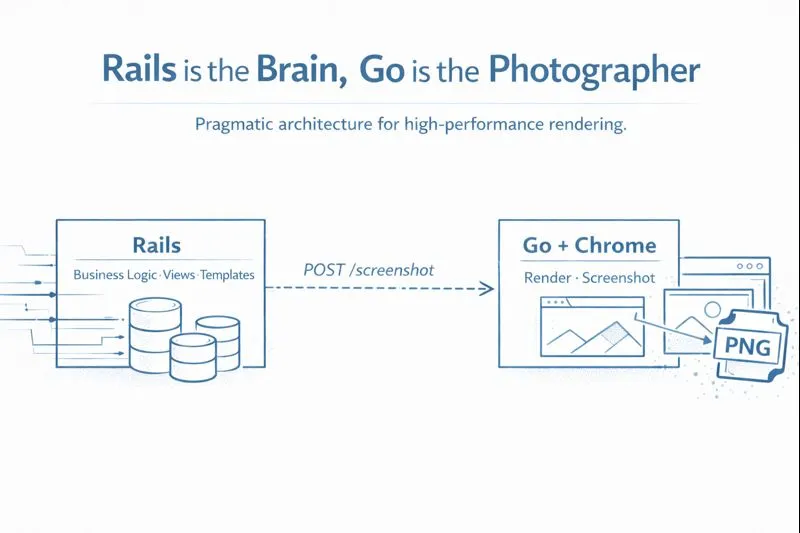
Rails is the Brain, Go is the Photographer
I’ve been a developer for over 20 years. I love Ruby on Rails. It is, without a doubt, the fastest way to go from “idea” to “shipped product.”
But for my latest project, AyatFlow, I hit a wall where Rails wasn’t the right tool for the job.
AyatFlow generates high-quality typographic art for Quranic verses. I wanted the design flexibility of CSS (custom fonts, flexbox, absolute positioning), but I needed the output to be a high-res PNG that users could share on WhatsApp or Instagram.
The standard way to do this is “Headless Chrome”—spinning up a browser instance, rendering the HTML, and taking a screenshot.
If you try to orchestrate a headless browser inside a standard Rails request cycle (using gems like Grover or Puppeteer), you are inviting chaos. Browser processes are heavy, memory-hungry, and prone to “zombie” processes. If a render hangs, your Rails worker hangs. In a containerized environment (like Docker on a VPS), one heavy screenshot job could starve your entire web server.
I didn’t want my homepage to lag just because someone was generating a 4K image.
So, I split the stack. I kept Rails as the “Brain” and hired Go as the “Photographer.”
The Architecture: A “Sidecar” Service
I didn’t go full “microservices architecture” with complex service discovery. I just built a “Sidecar.”
- The Brain (Rails 8): Handles the user interface, search logic, database, and providing the “Template” (the HTML/CSS to be rendered).
- The Photographer (Go): A tiny service using
chromedpthat manages a headless Chrome instance. It accepts HTML and returns a screenshot.
If the Go service is down or overloaded, the worst case is a failed image generation, not a degraded web experience.
Why This Doesn’t Belong in Rails
I chose Go for this orchestration for two specific reasons:
- Context Management: The
chromedppackage relies heavily on Go’scontext. This makes it incredibly easy to set hard timeouts. If a render takes longer than 2 seconds? Kill it. No zombie Chrome tabs left eating RAM. - Concurrency: Go handles the concurrent browser contexts much better than a single-threaded Ruby process. I can keep a “warm” browser instance running and just open new tabs (contexts) for each request, which is significantly faster than booting Chrome from scratch every time.
The Glue Code
The communication is boringly simple: HTTP.
On the Rails side, I construct the HTML payload (often just a simple render_to_string of a View component) and ship it to Go:
# app/services/image_generator.rb
class ImageGenerator
  def self.call(html_content, width, height)
    # The Go service runs on port 8080 within the same private network
    response = HTTP.timeout(5).post("http://image-service:8080/screenshot", json: {
      html: html_content,
      width: width,
      height: height
    })

    return nil unless response.status.success?
    response.body.to_s # Returns the PNG bytes
  end
end
On the Go side, I use echo for the server and chromedp for the heavy lifting:
// main.go

import (
	// other imports

	"github.com/chromedp/cdproto/page"
	"github.com/chromedp/chromedp"
)

type Payload struct {
	Html   string `json:"html"`
	Width  int64  `json:"width"`
	Height int64  `json:"height"`
}

func handleScreenshot(c echo.Context) error {
    var req Payload
    if err := c.Bind(&req); err != nil {
        return err
    }

    // Create a context with a timeout (Safety first!)
    ctx, cancel := context.WithTimeout(context.Background(), 5*time.Second)
    defer cancel()

    // Initialize Chrome (or attach to existing allocator)
    ctx, cancel = chromedp.NewContext(ctx)
    defer cancel()

    var buf []byte

    // The Magic: Render HTML, Wait for it to be ready, Snap Screenshot
    err := chromedp.Run(ctx,
        chromedp.Navigate("about:blank"),
        chromedp.EmulateViewport(req.Width, req.Height),
        chromedp.ActionFunc(func(ctx context.Context) error {
            // Inject the user's HTML directly into the page
            frameTree, _ := page.GetFrameTree().Do(ctx)
            return page.SetDocumentContent(frameTree.Frame.ID, req.Html).Do(ctx)
        }),
        chromedp.FullScreenshot(&buf, 90),
    )

    if err != nil {
        return c.JSON(http.StatusInternalServerError, map[string]string{"error": "Failed to capture"})
    }

    return c.Blob(http.StatusOK, "image/png", buf)
}
Deploying with Kamal
The best part of this setup is that deployment didn’t become a nightmare. I use Kamal.
I simply deploy the Go container alongside the Rails container on the same server. They talk over the private Docker network. If the Chrome process crashes (as browsers tend to do), the container restarts instantly without affecting the main Rails app.
The Pragmatic Choice
It is tempting to try and do everything in your primary language to keep the codebase “pure.” But sometimes, the best architectural decision is to admit that your framework shouldn’t be doing heavy lifting.
Rails manages the business logic. Go manages the browser. They work together perfectly. Frameworks are for coordination. Heavy lifting belongs where it can fail safely.